Forecast Weather using Python
In this blog post, we will learn how to forecast weather details. We will see the implementation in Python with hardly a few lines of code.

Hello reader!
Weather is the mix of events that happen each day in our atmosphere and is different in different parts of the world and changes over minutes, hours, days, and weeks. Rain and dull clouds, windy blue skies, cold snow, and sticky heat are very different conditions, yet they are all-weather. According to the Wikipedia definition:
Weather is the state of the atmosphere.
In this blog post, we will learn how to forecast weather details. We will see the implementation in Python with hardly a few lines of code.
Check out the Repository for Ultimate Resource in python. Drop a star if you find it useful! Got anything to add? Open a PR on the same!
You can refer to my YouTube video Tutorial to see a working tutorial for better understanding and a step-by-step guide of the same.
What will be covered in this Blog
1.    What is wttr?
2.    What is requests Module
3.    How to forecast the weather using Python
Let's get started!
What is wttr?
wttr — the right way to check the weather!
wttr.in is a console-oriented weather forecast service that supports various information representation methods like terminal-oriented ANSI-sequences for console HTTP clients (curl, httpie, or wget), HTML for web browsers, or PNG for graphical viewers.
wttr.in uses wego for visualization and various data sources for weather forecast information.
If you wish to know more about it, you can refer to wttr's GitHub Repo.
Module Used:
requests Module:
Requests is a simple, yet elegant HTTP library. It allows you to send HTTP/1.1 requests extremely easily. Requests officially support Python 2.7 & 3.5+.
If you wish to know more about it, you can refer to Requests Module Documentation.
Now that you are familiar with Requests Module basics and have acquired basic knowledge of wttr, we can move forward to the coding section.
Time to Code!
You can find all the code at my GitHub Repository. Drop a star if you find it useful.
 In order to access the Python library, you need to install it into your Python environment
pip install requests
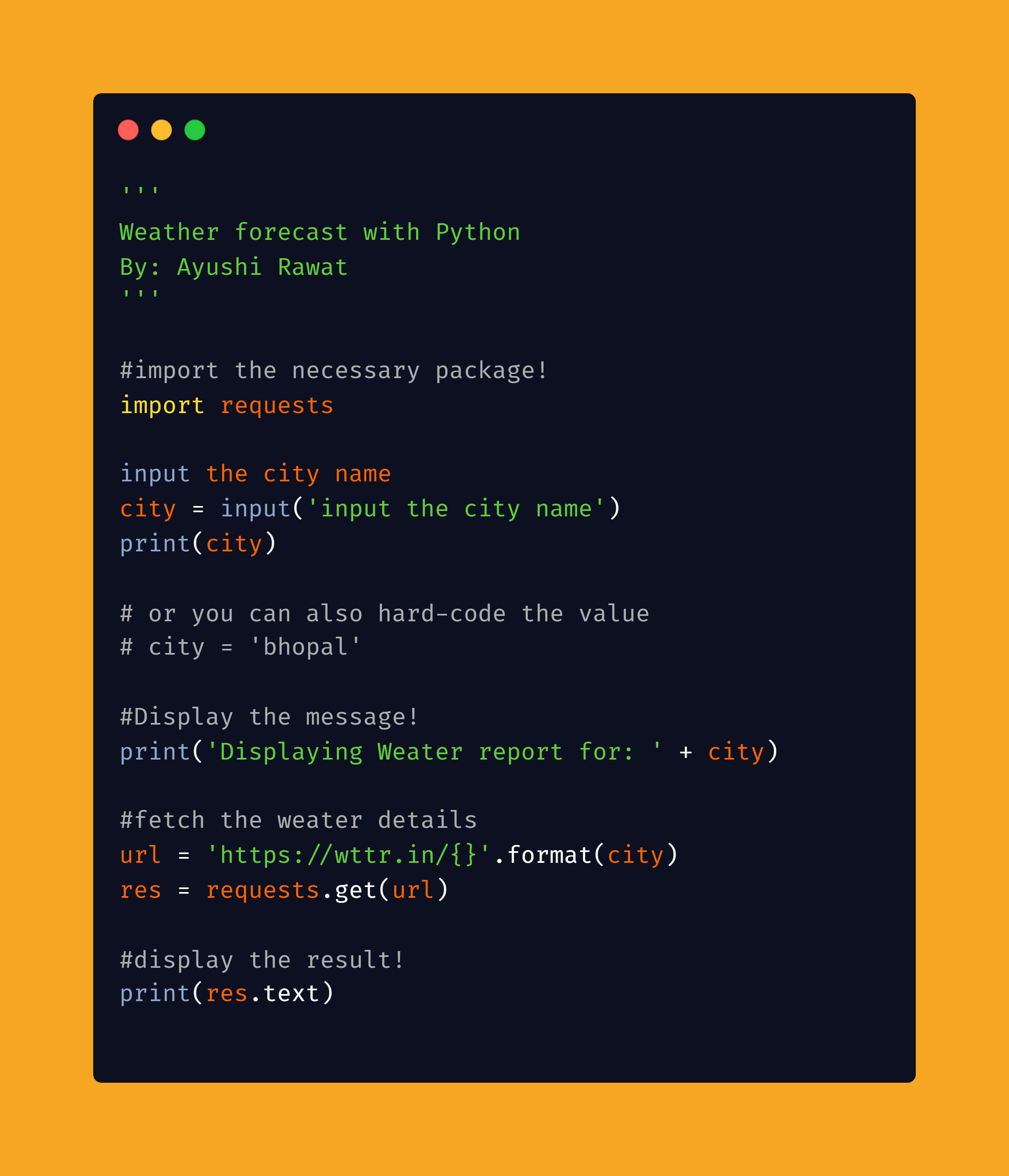
Now, we need to import the package into our python script. Use the following command to do so.
import requests
Now that we have imported the library using the command import requests, let's proceed.
Let's ask the user to input the city name for which he/she wishes to fetch the weather details.
city = input('input the city name')
print(city)
You can also hard-code the value if you will only check for yourself.
city = 'bhopal'
Now, let's display a simple message.
print('Displaying Weather report for: ' + city)

#output:
Displaying Weather report for: bhopal
Let's define the URL, We will make use of format to pass city as a parameter here.
url = 'https://wttr.in/{}'.format(city)
It's time to make use of the requests module.
res = requests.get(url)
Our resultant data is stored in res. We will make use of the text method to extract our desired weather details and let's display the result.
print(res.text)
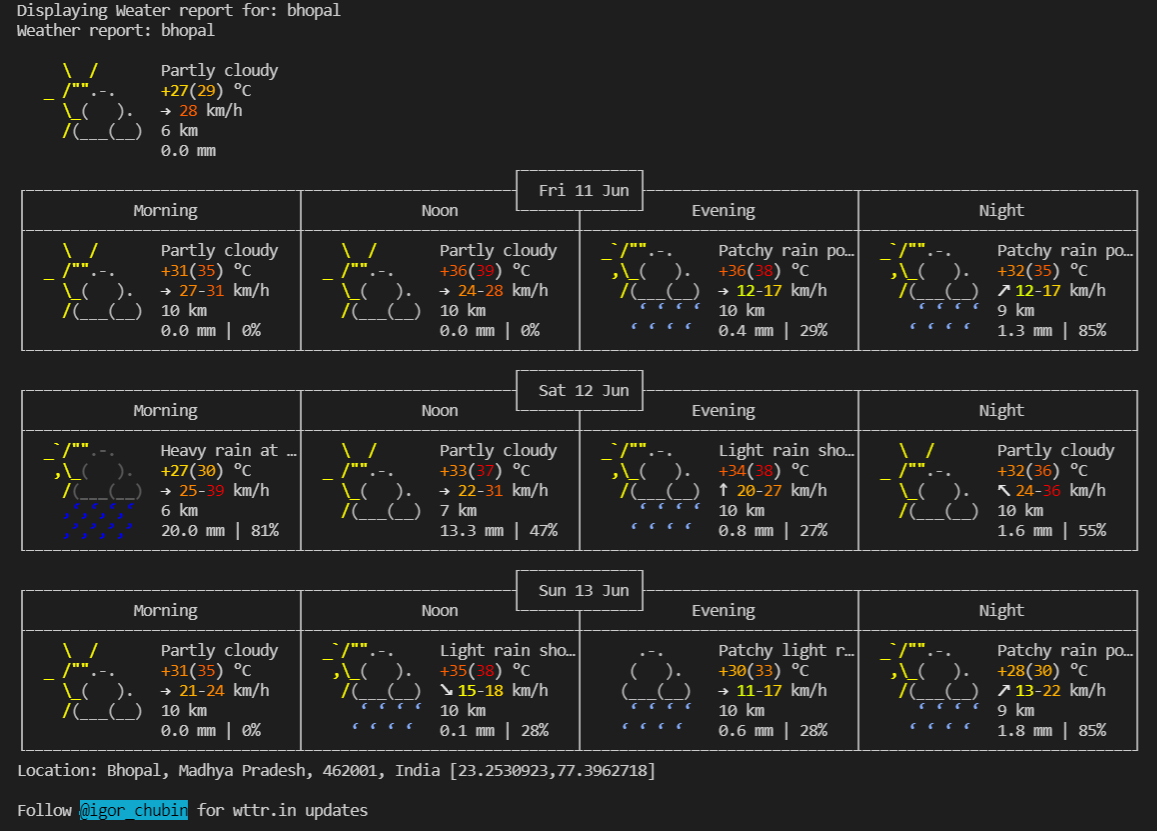
This is how the Weather Forecast will look like:
Isn't it beautiful? And with that, it's a wrap! I hope you found the article useful! Share in the comments below. I create content about Career, Blogging, Programming, and Productivity, If this is something that interests you, please share the article with your friends and connections. You can also subscribe to my newsletter to get updates every time I write something!
Thank you for reading, If you have reached so far, please like the article, It will encourage me to write more such articles. Do share your valuable suggestions, I appreciate your honest feedback!
I would strongly recommend you to Check out the YouTube video of the same and don't forget to subscribe to my Channel. I would love to connect with you at Twitter | LinkedIn.
You should definitely check out my other Blogs:
- Python 3.9: All You need to know
- GitHub CLI 1.0: All you need to know
- How to make your own Google Chrome Extension
- Run Javascript from Python
- Automate WhatsApp using Python
- Automate Cowin Vaccine slots Availability using Python
- What is Competitive Programming
Resources:
- https://scied.ucar.edu/learning-zone/how-weather-works/weather
- https://en.wikipedia.org/wiki/Weather
- https://github.com/chubin/wttr.in
- https://pypi.org/project/requests/
- https://docs.python-requests.org/en/master/
See you in my next Blog article, Take care!!
About the author
Comments
Join the discussionThe way you presented complex information so simply is remarkable. It took me a little while to read all of the comments, but I found the article to be quite intriguing. pips
I sincerely appreciate all of your essential assistance in advancing my professional growth and promoting a positive outlook. fnaf unblocked
I am grateful for your vital role in advancing my career and inspiring a positive perspective for the future. space waves
Didn’t get anything right that and I have to regain the content with a good PR. I am offering the best content which is not heavy and reduced all the part. Although, offering Digital Marketing Dissertation Help Service with best prices.
To make an accurate prediction of the weather at a specific location and time is the job of a weather forecaster dinosaur game . Predicting the weather for the next n days is possible with the help of weather data and algorithms.
I want to say that the way you illustrate such a complicated topic in the simplest way is marvelous. If you need Transportation services then we offer the best airport transportation services to the Putnam Valley NY area. Reserve a ride today with our professional drivers!
I really appreciate this wonderful post that you have provided for us. I assure you this would be beneficial for most people
I like your efforts and am grateful that you chose this debate topic. Song Galaxy Discount Code
Some are perfect in their own right, you are one of them, great post
I’ll be honest; you have written this article excellently! It was very helpful for me to develop my mini forecast program for my IT course assignment. I have recently started taking IT courses, and sometimes I struggle with it. Sometimes with my school essays, I have found an essay writing service in Boston that helps me out in this situation, and sometimes in my code and for this, I have pro developers like you to guide me! Thank you so much!
Technical Tutorial - Python Projects
The series content will mostly cover Technical Python tutorials and my recent learnings and experience in Python.